Reviving the AT&T Sceptre
I don’t know when I first became aware of the AT&T Sceptre. It was several years ago; I think someone posted a photo of one somewhere and I became instantly mesmerized by the weird little beige box. I always liked the design language of the basic set-top-box with black bezel and an iconic “AT&T” logo. It reminded me of AT&T’s much older Dataphone line of modems (the Dataphone II, or Dataphone 300 specifically, and apparently the Sceptre shares some of the same DNA with the older models), but in larger footprint and a touch more approachability. This is something that could sit in the family room, not just the home office.
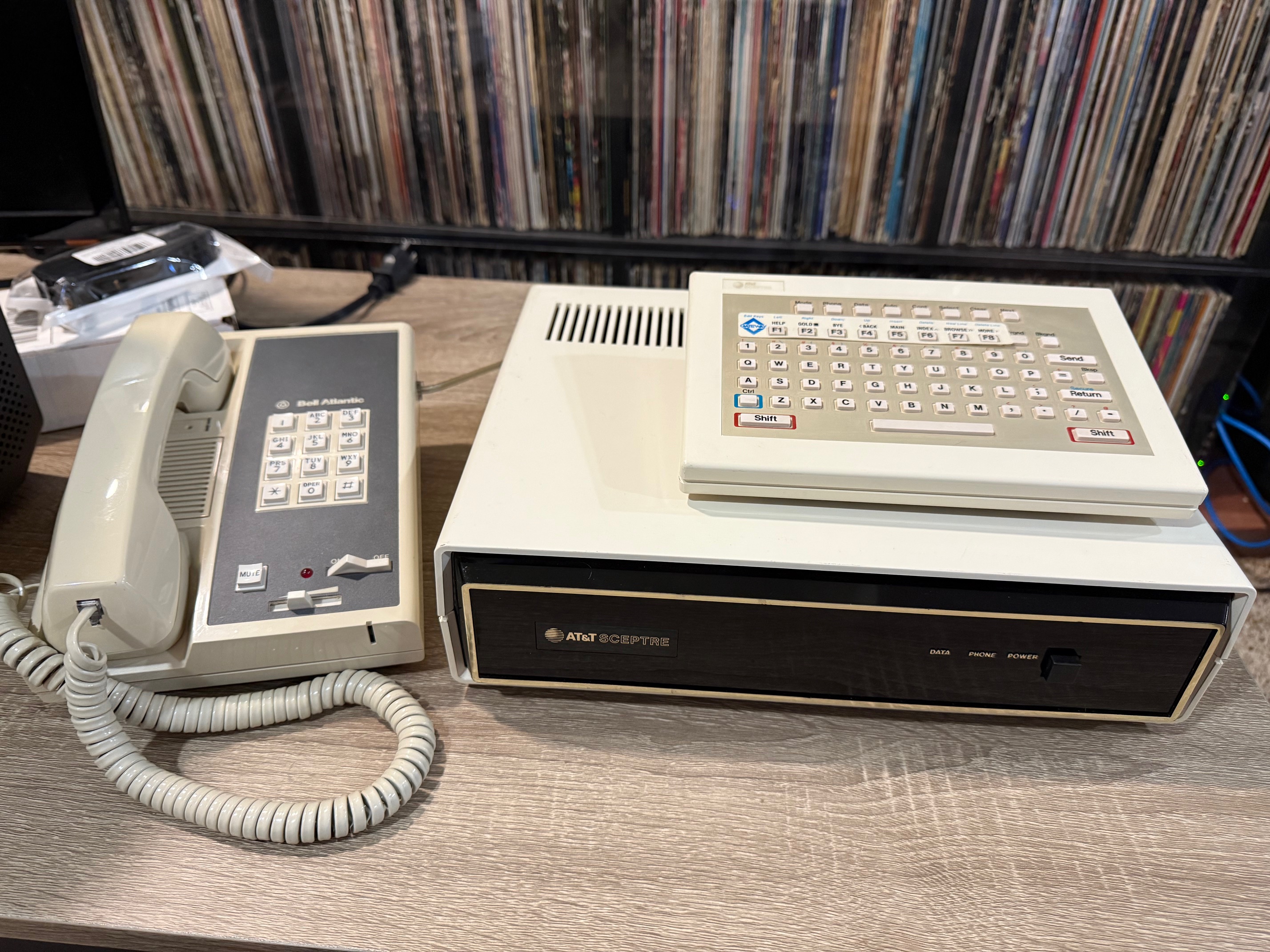
At the time, all I really knew about it was that it was some device that you’d connect to a television set. “WebTV but in the ’80s” was how I had seen it described, and looking back this is a pretty appropriate description.
I had an eBay saved-search set for years trying to get one, but the few that were listed always sold for too high of a price. I never really understood why, or who was buying them. The original services were long offline and from some minimal searching there wasn’t any project of hobbyists building a new one. Maybe the people purchasing them were enamored just as I was, and wanted one simply to look at or a fill a hole in some weird telephone ephemera collection.
Eventually the planets aligned and I was able to get one for about $100. Of course, I needed to learn more about it and made myself a promise that it wouldn’t sit on a shelf. If I got it, it would need to do something, even if that was just some proof-of-concept project.
Some History
The Sceptre was a graphical “videotex” (interactive content displayed on a video monitor) terminal, a piece of expensive, long-shot technology birthed from a collaboration between AT&T and several news outlets as a way of getting more information into more people’s households. This was the World Wide Web a decade before the World Wide Web would be born. And as you may guess, there are reasons why you likely haven’t heard of it.
This wasn’t created on a whim. In 1978 the Canadian Communications Research Center (CRC) launched Telidon, an interactive videotex platform featuring 2D color graphics. Compared to text-based systems of the time, Telidon was groundbreaking and quickly became a standout in computer technology, allowing users to interact with services like news, banking, travel booking, and more from the comfort of their own homes.
AT&T followed suit in 1983, partnering with 16 other organizations to turn Telidon into the NAPLPS (North American Presentation Layer Protocol Syntax) standard that could be adopted by terminal manufacturers and content service providers alike. In the US, the Sceptre would be used in at least 4 different services:
- Knight Ridder’s Viewtron service in Florida (a joint venture with AT&T)
- The Los Angeles Times’ Gateway service in Southern California (a joint venture of Times Mirror and InfoMart of Canada)
- Covidea in New York (a joint venture by AT&T and Chemical Bank, with Time Inc. and Bank of America)
- Aviotex’s TABS service in California
Aside from those, Keyfax was operating in Chicago as a joint venture by Field Enterprises and Centel (though they used Honeywell terminals) and another venture ran by AT&T and CBS operated under a trial in Ridgewood, NJ before the two companies parted ways with CBS going on to partner with IBM and Sears to form Trintex which would later turn into the widely-popular Prodigy online service.
Soon though, the bubble would burst. Telidon and Keyfax were discontinued in 1985, Viewtron and Gateway in 1986, and Covidea (and most others) in 1989. While the US systems lacked the government backing that allowed Telidon to thrive as long as it did, the main failures of these systems were the associated operating costs and poor user adoption, again caused by high upfront costs for a terminal and monthly subscription fees. NAPLPS would live on in Prodigy (as previously mentioned), the NABTS protocol (for one-way, North American teletext), WebTV for Windows, and a few other niche areas, but is mostly forgotten today.
Technical Specs
The Sceptre seemingly has a lot of horsepower for a terminal. The basic specs are as follows:
- Intel 8088 processor (the same as used in the original IBM PC)
- 127K ROM
- 48K RAM
- Motorola 6845 display controller
- 16-color display with a palette of 256 colors
- Full IR wireless keyboard, powered by 9V battery
- 1200/75 baud 7-bit modem
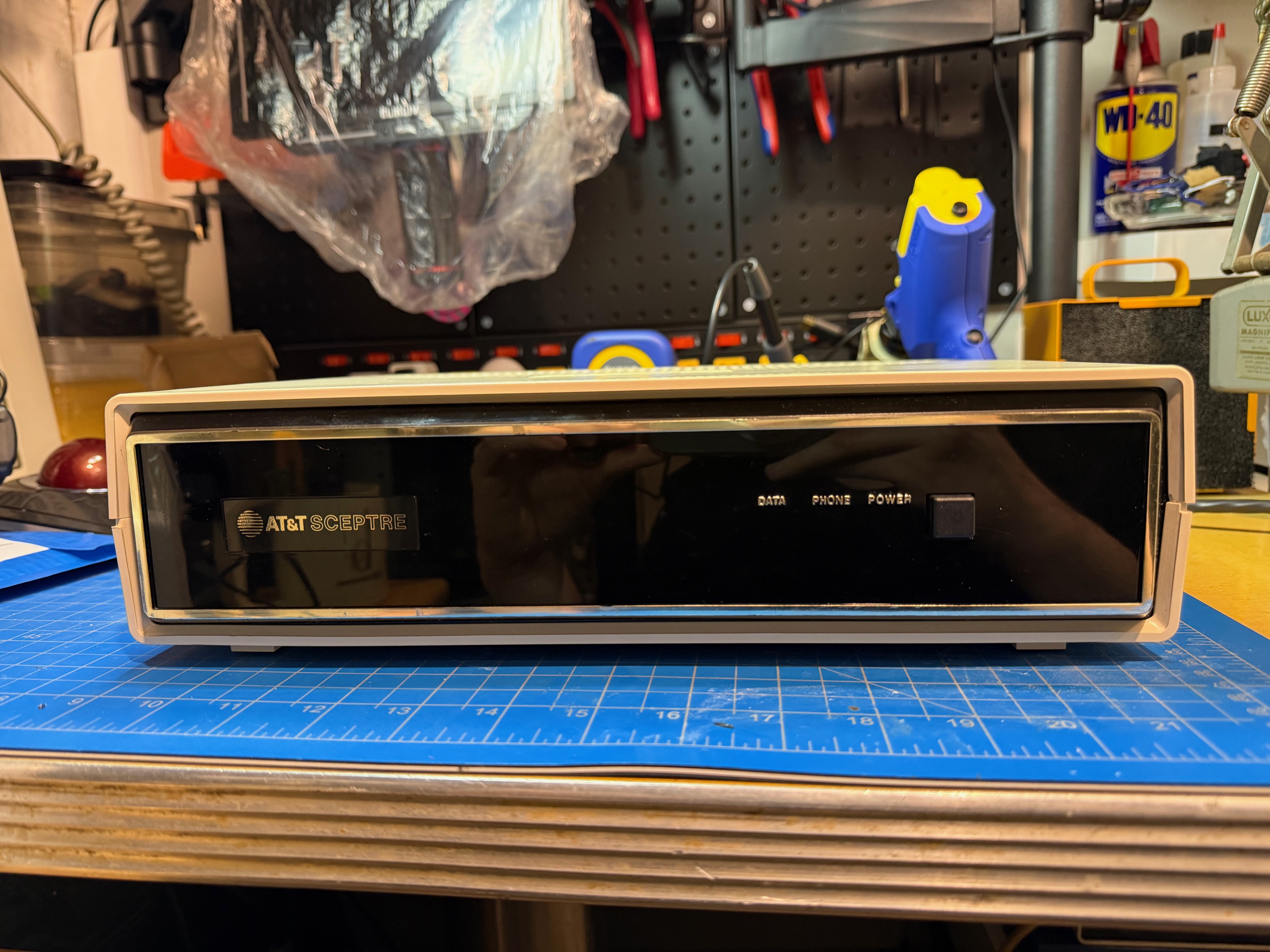
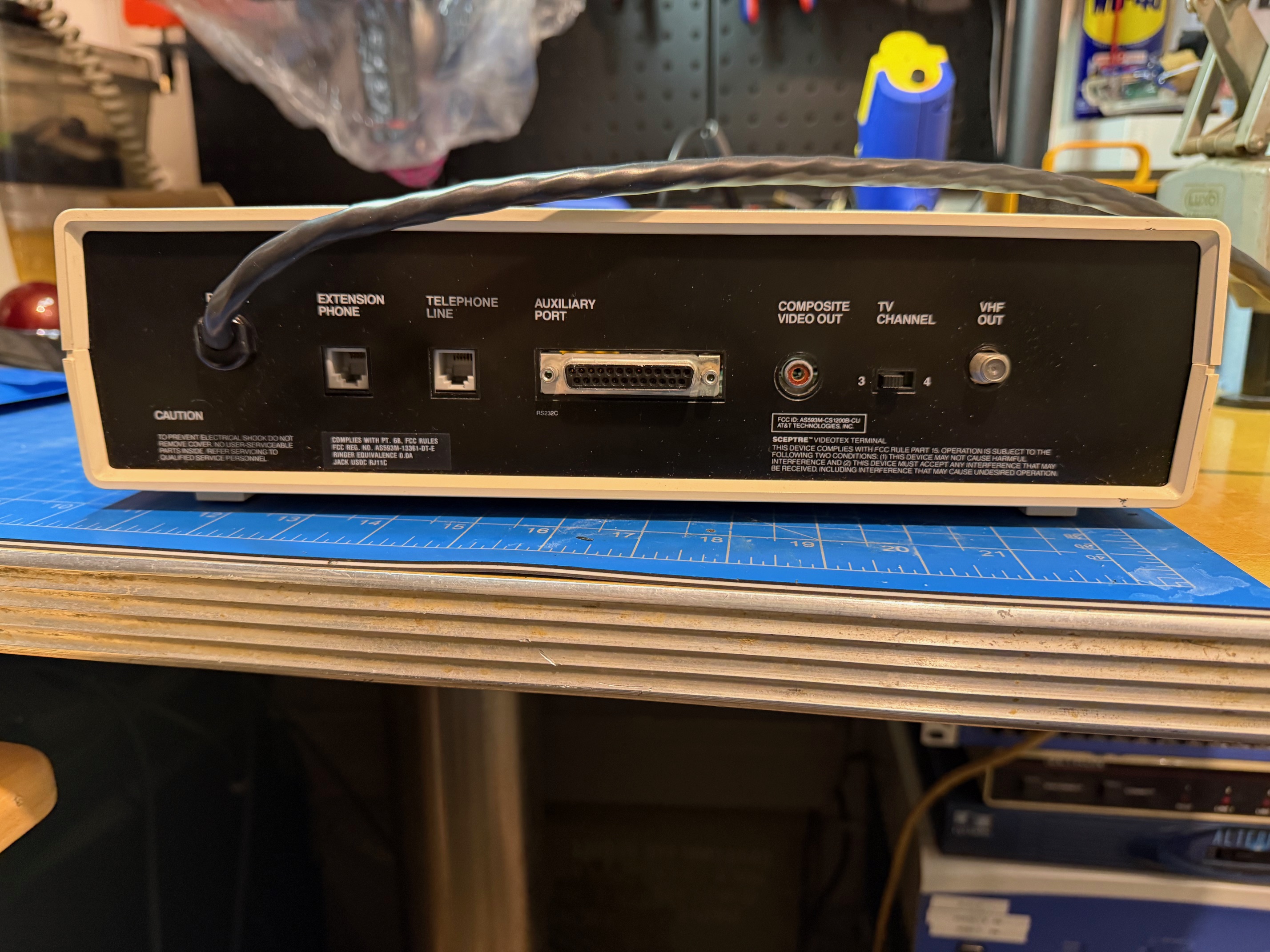
The terminal has a hard-wired power supply, with large external transformer (there is a later revision with a detachable cord as well, and it looks like it also has two boards in the same housing to accommodate an integrated power supply!), composite and RF video output, two RJ11 jacks for line and phone, and a DB25 port for printer support (though apparently this only supported very specific models, if at all).
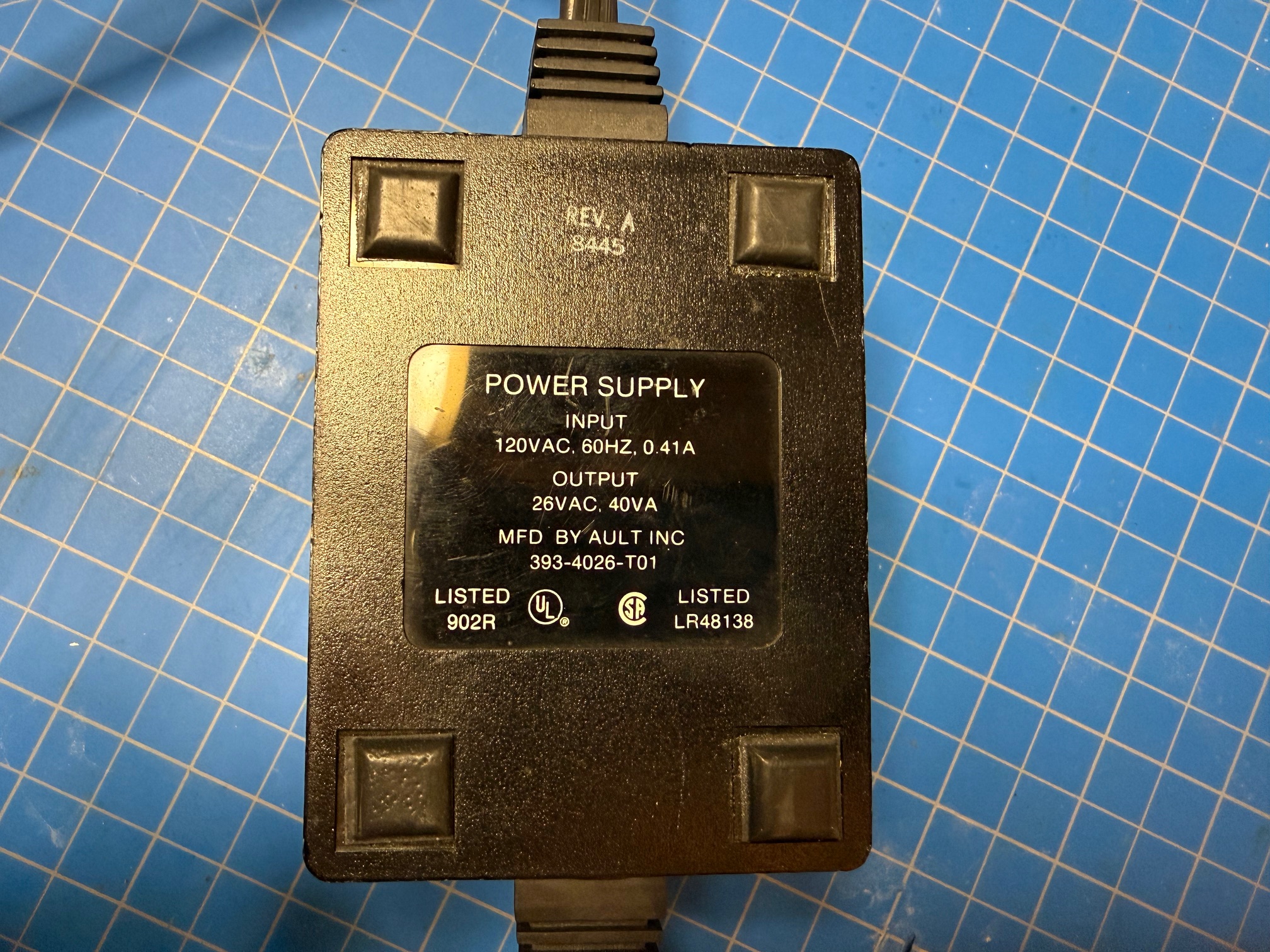
The transformer is rated to take an input of 120VAC, 60Hz, 0.41A. The output is 26VAC, 40VA.
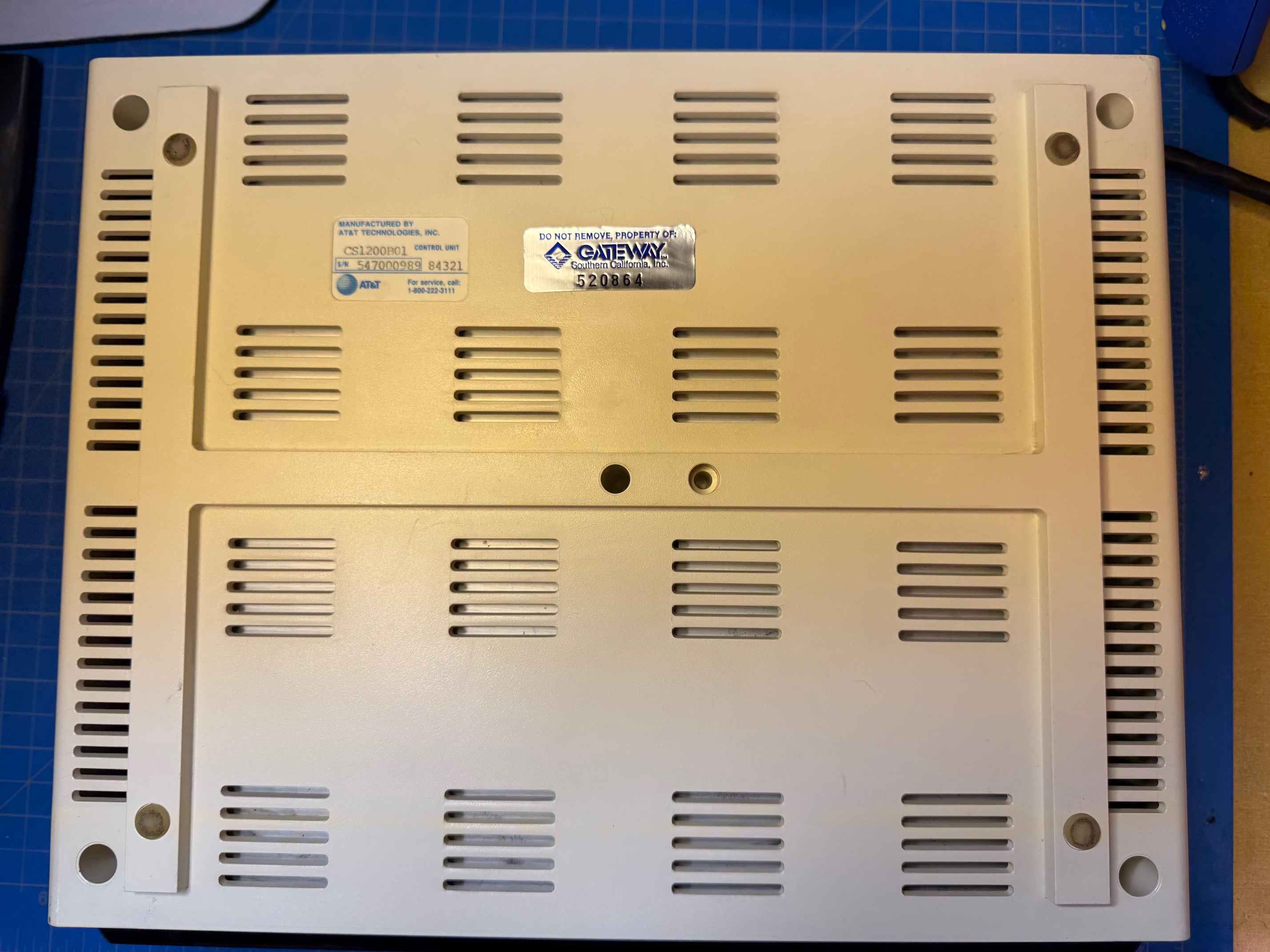
The system is passively cooled and has vents in the plastic housing. Only 4 captive flat-head (very AT&T of them) screws keep the case together.
My unit has an AT&T sticker stating that this is a modem CS1200B01 control unit with serial number 547000989. There is also a stamp on this sticker reading 84321, possibly a date code meaning the 21st day of the third month of 1984 or the first day of the 32nd week of 1984. There is also a sticker stating that this Sceptre is the properly of Gateway, with a code 520864, likely an asset tag. This is an indicator that this Sceptre was used for the Times Mirror Gateway service.
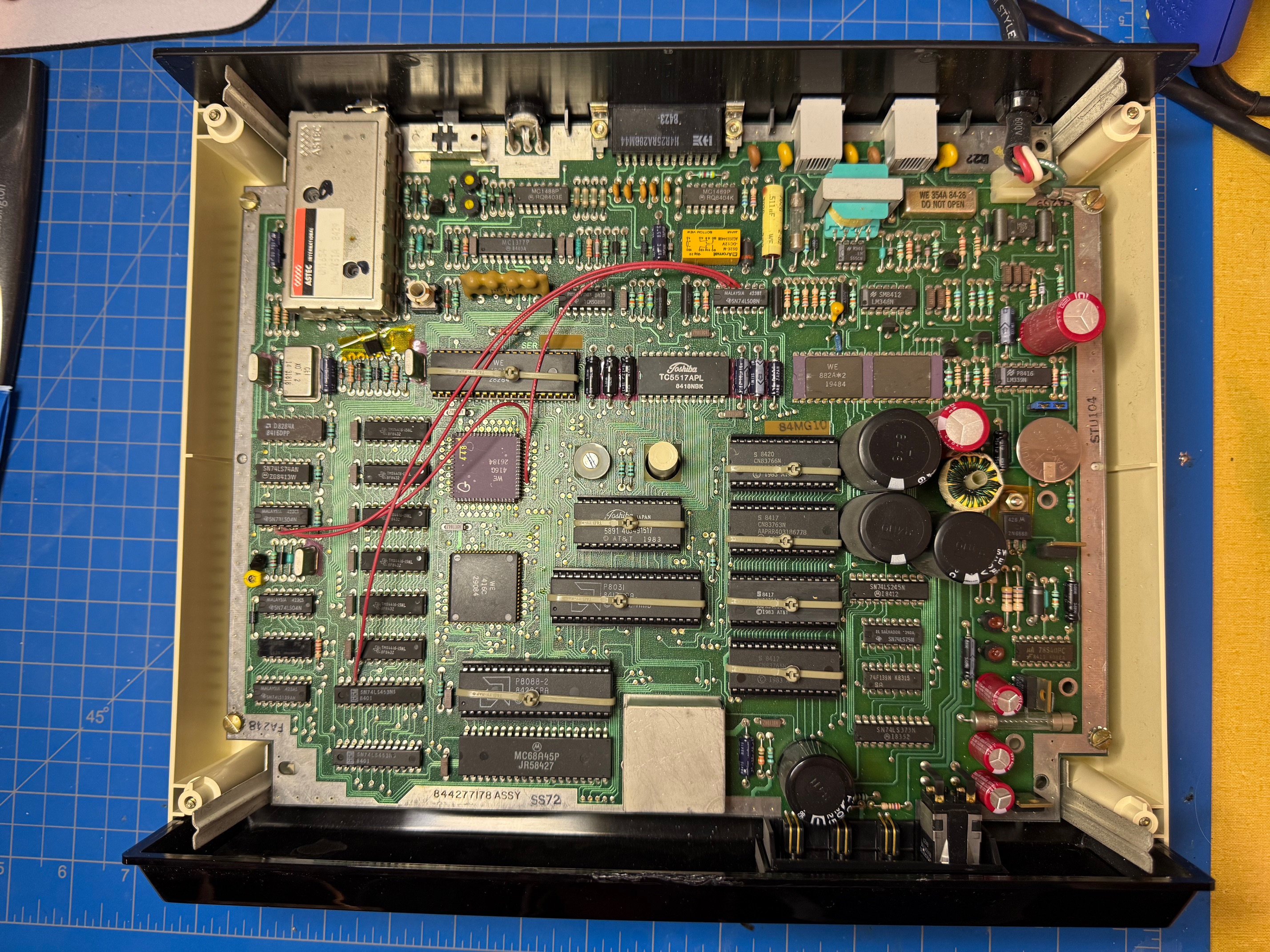
Inside are a slew of ICs:
- 1x UA78S40PC - universal switching regulator subsystem
- 1x LM339N - analog comparator
- 1x SN74LS373N - 8-bit latch
- 1x SN74LS245N - tri-state octal bus transceiver
- 1x 74F139N - decoder/demultiplexer
- 1x SN74LS75N - 4-bit latch
- 1x LM348N - operational amplifier
- 1x 555CN - timer
- 1x WE 882A*2
- 1x AT&T CN83763N
- 1x AT&T CN83764N
- 1x AT&T CN83765N
- 1x AT&T CN83766N
- 1x MC68A45P - character display controller
- 1x P8088-2 - 8088 microprocessor, 8-bit 8MHz
- 1x TMM2364P - 64K mask ROM
- 1x TC5517AP - 8-bit static RAM
- 1x SN74LS08N - 4-channel logic gate
- 1x MC1498P - quad line EIA-232D receiver
- 1x MC1488P - quad line EIA-232D driver
- 1x MC1377P - RGB to PAL/NTSC encoder
- 1x TCM5089N - tone encoder
- 1x WE 408A*1
- 1x WE 416G
- 1x WE 416C
- 2x SN74LS453NS - multiplexer
- 6x TMS4416-15NL - 4-bit static RAM, 50ns
- 1x D8284A - clock driver
- 1x SN74LS74AN - flip flop
- 2x SN74LS04N - 6-channel inverter
- 1x 74F32 - quad 2-input OR gate
- 1x SN74LS139AN - dual 2-line to 4-line decoders/multiplexers
The Western Electric and AT&T chips have unknown purposes.
The board also seems to have a rechargeable 3V battery soldered on, which should probably be replaced. Something I always find interesting are the bodges done on the board after manufacturing. There are quite a few here.
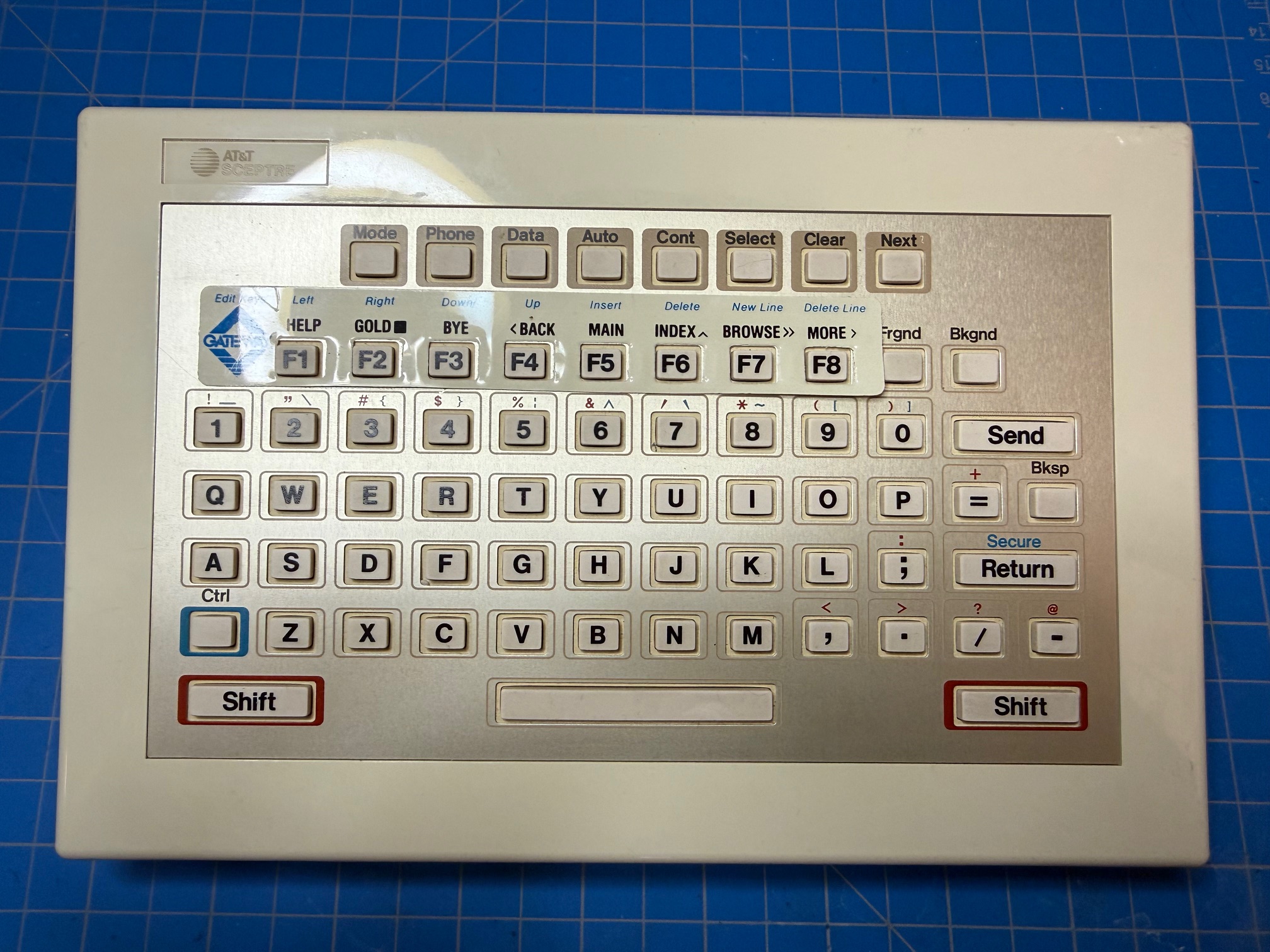
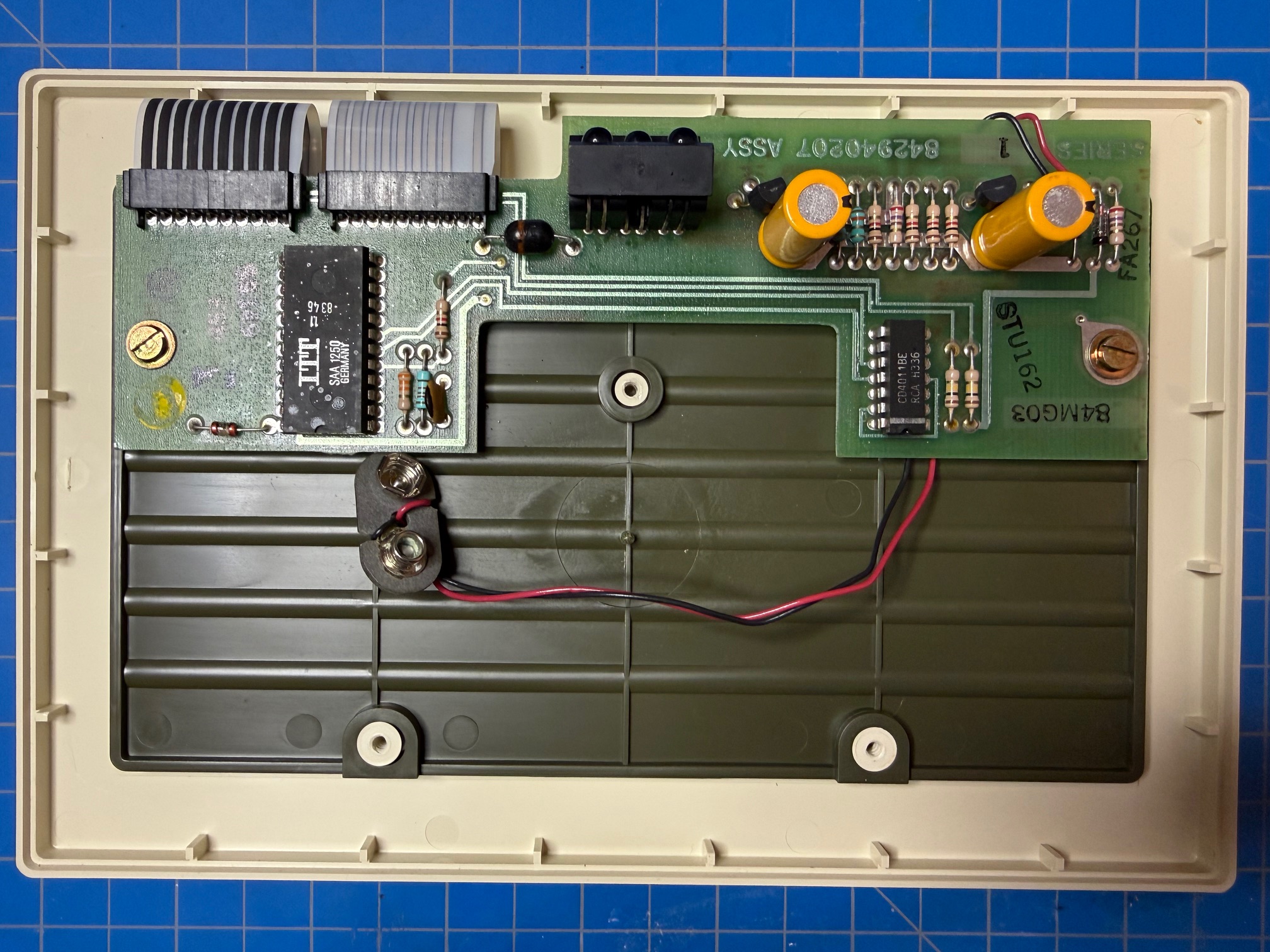
The keyboard is powered by 9-volt battery and communicates with the terminal via infrared. It has 67 keys, utilizing a membrane, including a set of function keys that seem to have an overlay sticker for the service the terminal was to be used for. My keyboard is branded “AT&T Sceptre” though others seem to be branded “American Bell.”
This keyboard has a Western Electric sticker marking this as a model CS1000A01 keyboard with serial number 066007322. There is a second sticker with the Times Mirror company logo and the number 086868, likely an asset tag. In red ink stamped on the back is the numeric string 08084, likely a manufacturing date code corresponding to something like the eighth week of 1984.
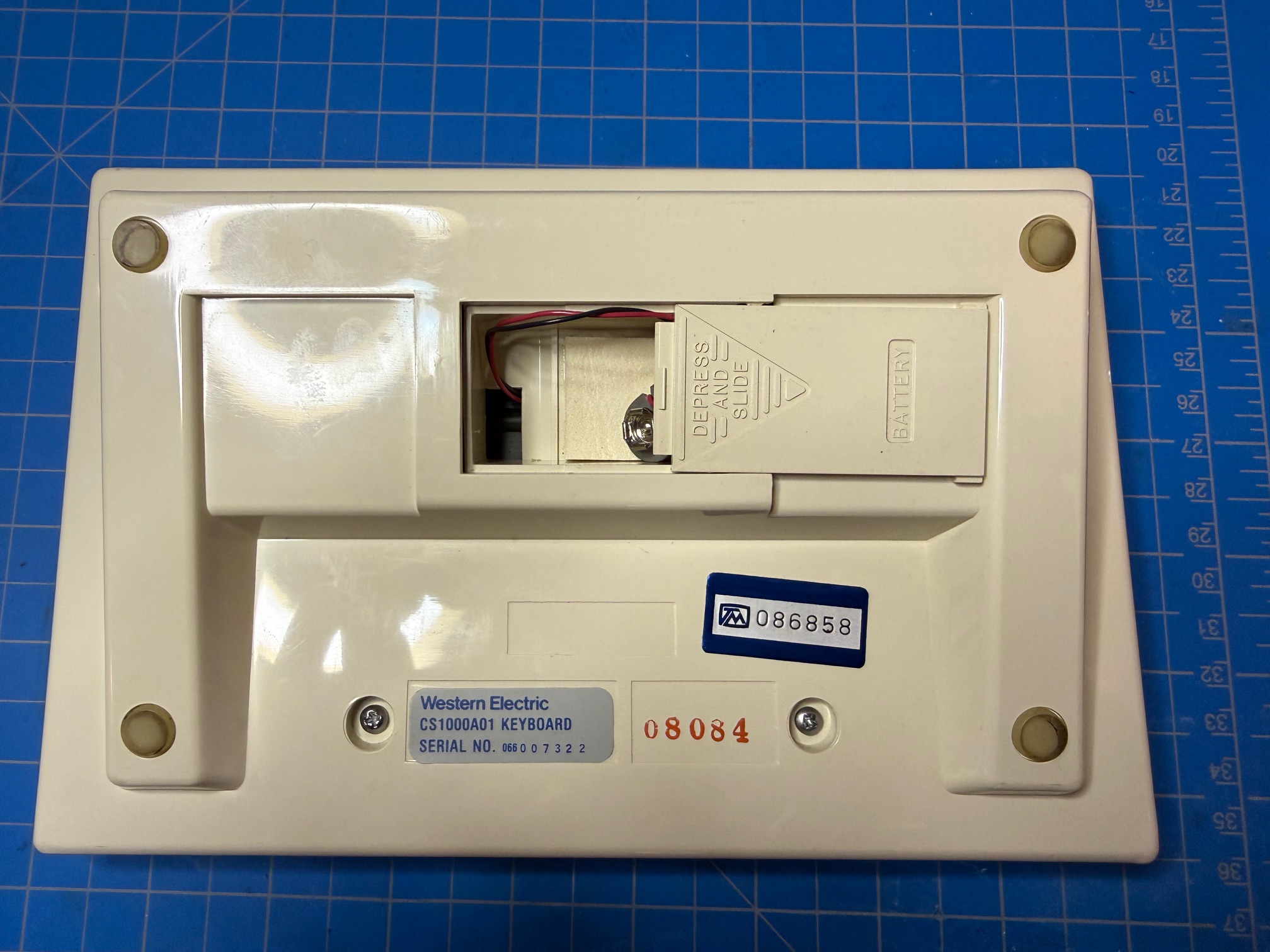
Three Phillips head screws hold the keyboard together. Two screws are visible on the back of the unit while the third is under a pad in the battery compartment.
The ICs in the keyboard are:
- 1x SAA 1250 - infrared remote-control transmitter
- 1x CD4011BE - quad 2-input NAND gate
All button-press signals, including permutations via the Shift and Ctrl modifier keys were captured via Flipper Zero and are available here. With these signals captured, the original keyboard is not needed for operation provided the user has some other way to send these signals.
A copy of the Sceptre manual (with bonus instructions for connecting to Aviotex) can be found here.
Gathering NAPLPS
As previously mentioned, the Sceptre is a NAPLPS-compatible terminal intended for use with a NAPLPS service. From what I have heard, the Sceptre is capable of handing standard ASCII connections over something like Bell 101/103, but I didn’t pursue this route as I wanted to actually display NAPLPS as originally intended.
NAPLPS is can be thought of in terms of “pages” that are rendered on the screen in real time. The more complex the page, the longer it takes to render. Some artwork can take 10s of minutes to fully load, even in ideal conditions. I haven’t read the NAPLPS specification, but from my messing around it seems that pages are stored in a binary format consisting of ASCII text and commands to draw the vector imagery that are processed by the terminal. Some features like form input or palette swapping are black boxes to me, but ultimately tangential to my primary goal of simply displaying NAPLPS.
I didn’t want to make my own NAPLPS images, as I was initially under the assumption that no tools that could be used to draw it were still available (which I later learned was false after finding a directory on textfiles.com containing Microstar Graphics Editor) and I certainly didn’t want to roll my own software. Luckily I became aware of the work of John Durno, specifically remembertomorrow.ca, who has spent over a decade restoring Telidon artwork, preserving its culture, and publishing resources on both NAPLPS and Telidon.
It cannot be overstated how much of the artwork and knowledge around NAPLPS would be lost if it wasn’t for the efforts spearheaded by John.
It didn’t really occur to me previously that artists would use NAPLPS as a medium for their work, but I grew to understand how it could be fun to work with and how portable it was. Luckily, a lot of these works live on as .nap files and can be found all over the Internet. A few places I found files includes:
- http://cd.textfiles.com/simtel/simtel20/MSDOS/NAPLPS/.index.html
- https://github.com/n1ckfg/Telidon
- John Durno’s own
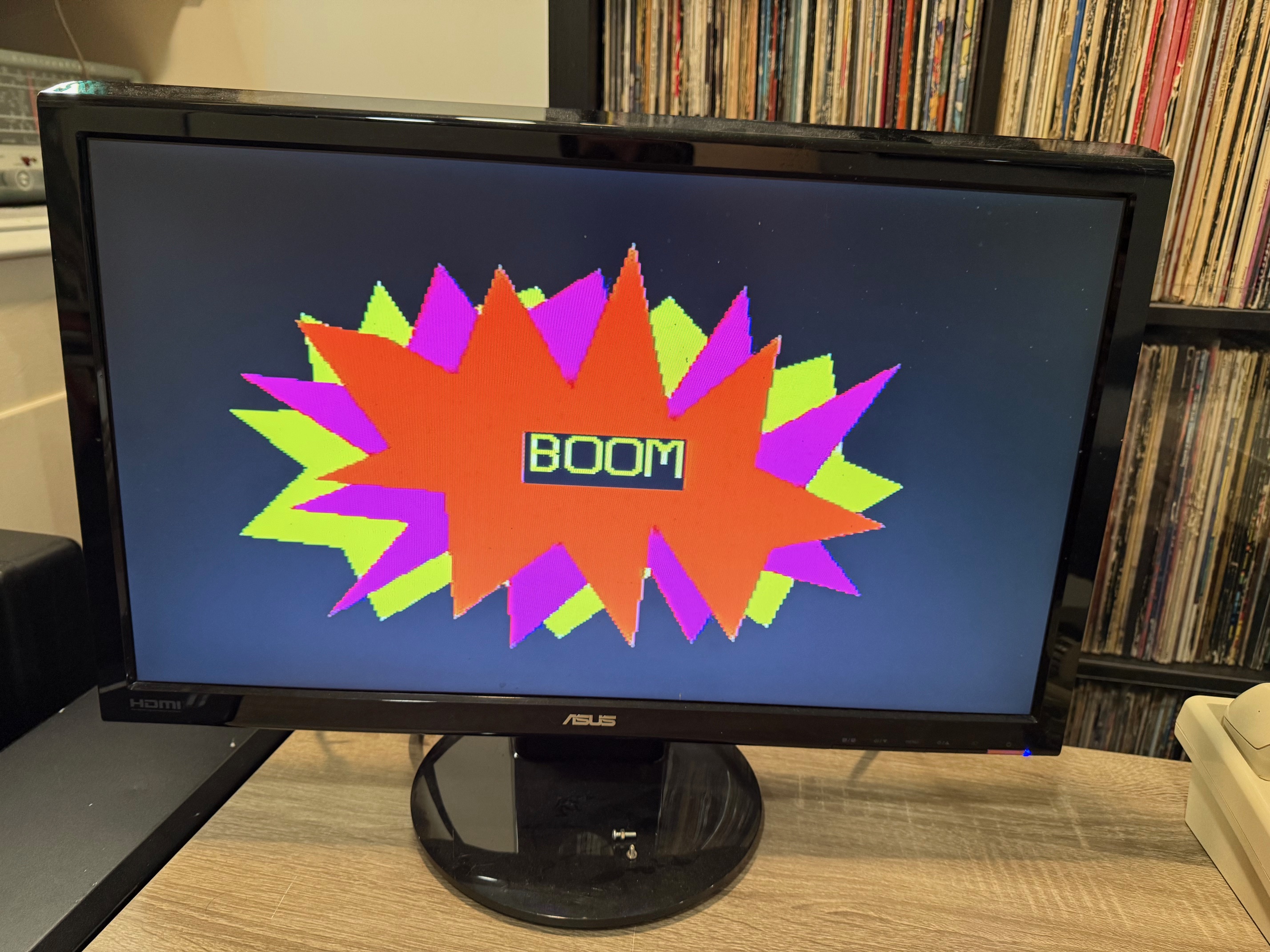
boom.napvia https://dspace.library.uvic.ca/items/599ee778-0bac-452e-9624-b5c04832a0d7
Making a Connection
The next step was to find a way to connect the Sceptre up to a computer so NAPLPS could be sent and rendered client-side. Unfortunately, I wasn’t able to find any existing software purpose-built for sending NAPLPS like this. It seems there are a few solutions to rendering NAPLPS graphics in a modern way on modern hardware, but not as much love for keeping the older machines alive.
Luckily, I found a video of a different NAPLPS-compatible terminal being sent files and rendering them! The video, Vintage Bell Alextel computer terminal can display graphics! by vintagecomputer.ca, showcases a Bell Alextel, a monochrome clamshell-style terminal that I hope to get my hands on someday.
To connect the terminal to a host computer, the video shows a telephone line simulator to emulate a telephone network as well as some sort of modem running on the computer side to act as the counterpart to the modem in the Sceptre. I decided to use a Viking DLE-200B as my line simulator since I had one already and thought it would be more reliable than using VoIP or a PBX for testing purposes.

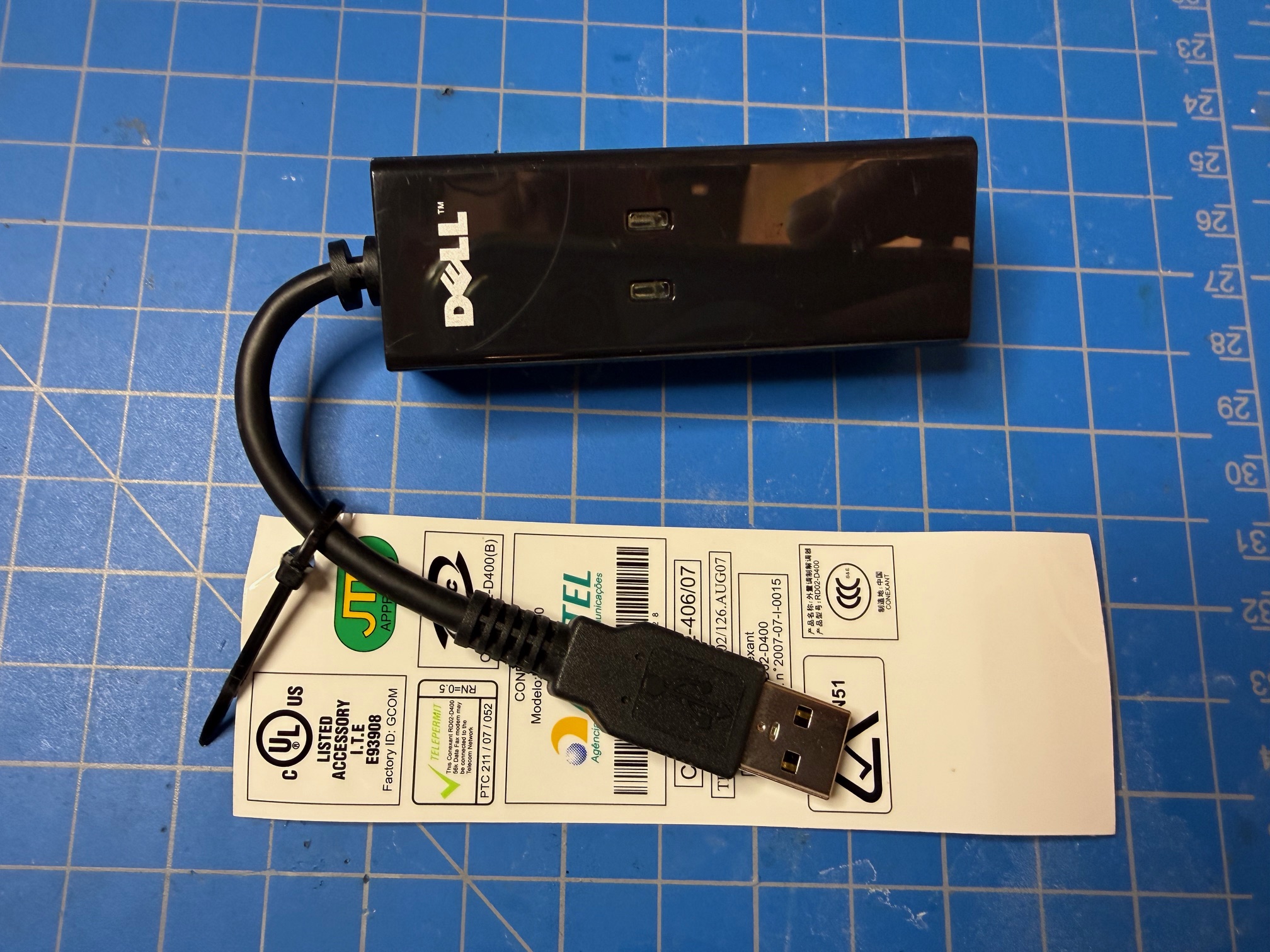
For the modem, I used a cheap Conexant RD02-D400 USB modem and wired everything up with standard 2-wire telephone cabling.
To recreate the setup of the host computer, I used a machine running Windows 10 with the open-source Tera Term software.
I set the serial port configuration as follows:
- Port:
COM1(may be different on your system, check Device Manager) - Speed:
9600 - Data:
8 bit - Parity:
none - Stop bits:
1 bit - Flow control:
RTS/CTS - Transmit delay:
20msec/char
The transmit delay proved to be essential and the terminal can’t generally keep up with the data is receives.
The Sceptre also needs to be configured with connection settings that match our Tera Term session, after powering it on we can set one of the connection slots from the landing screen (also referred to as the Data Base Access screen) by pressing MODE on the keyboard for the Mode Select screen and then 2 for Directory. Then press a number 1-5 to create an entry with the following:
- Name: any
- Contents: SHIFT+PHONE
5555555SHIFT+DATA - Setup Parameters:
yes - Parity:
None - Duplex:
Full - All Caps:
Off - Protocol:
NAPLPS 8 - Sync/Async:
Async-1200 - Flow Ctrl:
On/On - EOL Char:
CR
Note that the phone number 5555555 can really be anything with this setup. By default, the Viking line simulator acts as a “ringdown line” meaning if either party goes off-hook it instantly calls the other, regardless of the number dialed.
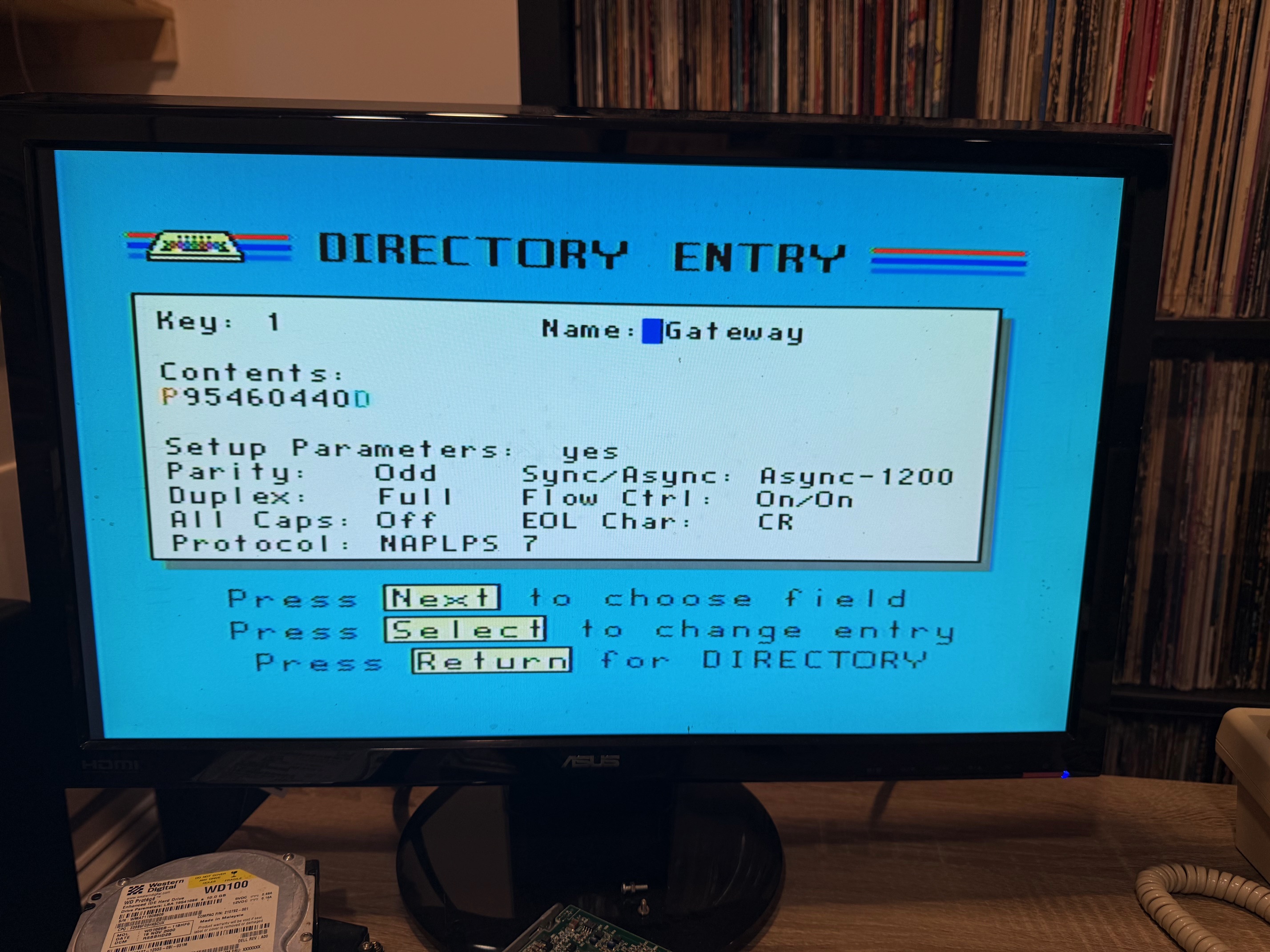
Then press RETURN to save. Press MODE to return to the Mode Select screen and 1 to go back to the Data Base Access screen. From here you can press the digit of the entry you made to start the call.
After starting the call, we go back to the Tera Term session and wait to see RING coming from the modem, indicating an incoming call. We then enter in ATA to answer and we are now connected to the Sceptre.
Now we can start sending files. If we drag-and-drop a .nap file into the open terminal, a dialog box will appear for settings to send the file. Here, we need to make sure that the Binary option is set under Send File before pressing the OK button.
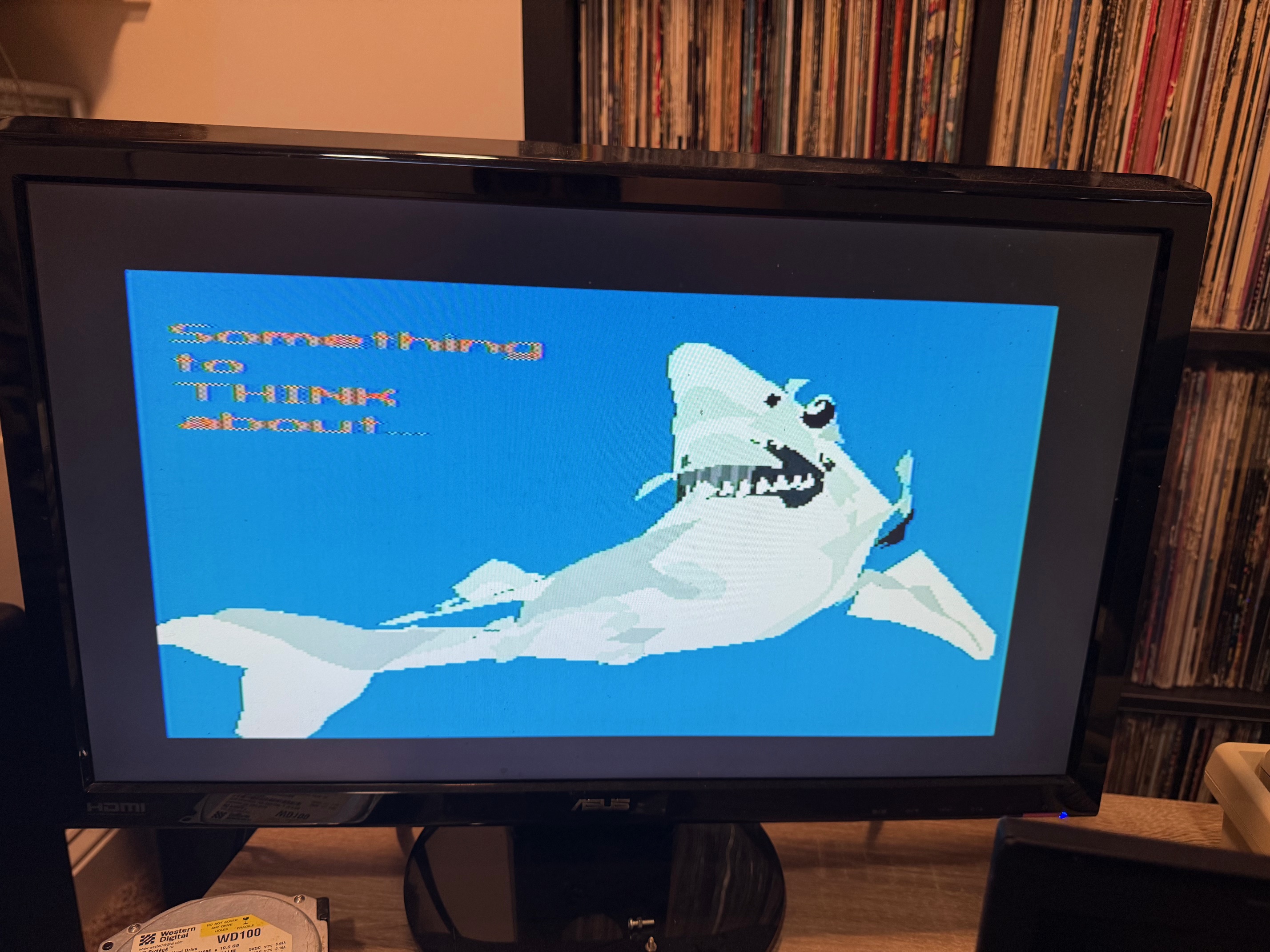
Just like that, the Sceptre will start receiving and drawing NAPLPS graphics!
Well, sort of.
For me, I had some drawing but a lot of parity error messages being printed to the screen as I initially had parity set on the Sceptre side (the configuration above is corrected if you’re playing around at home).
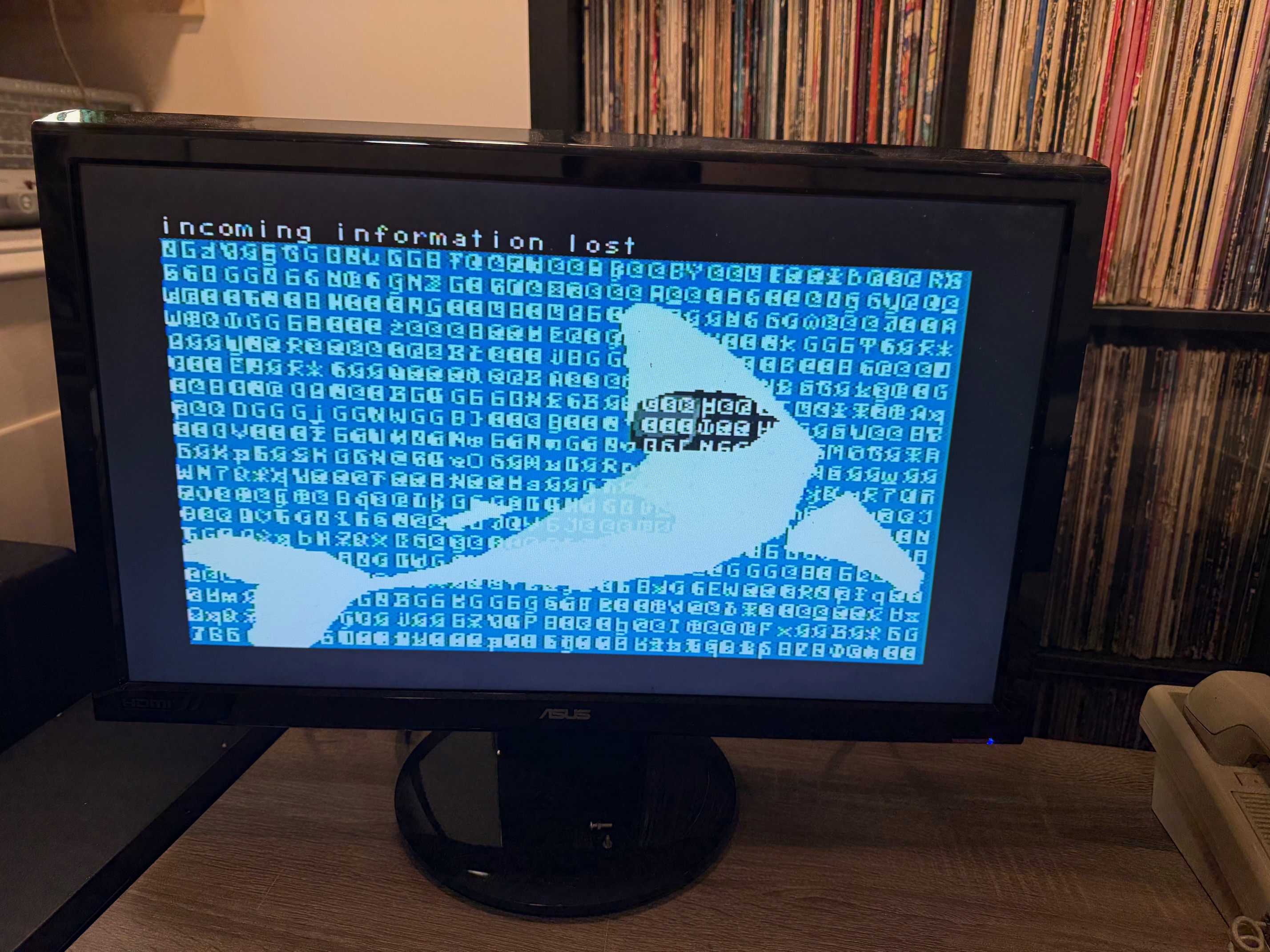
After fixing that, I had graphics rendering just fine any time I drag-dropped a file!
Writing a Server
I didn’t want to drag and drop files manually every time I wanted to see some graphics, so it was time to figure out how to do this myself.
As an aside, around the time I was starting to write something I actually managed to connect with John Durno to chat about NAPLPS and learned that he had built something, coincidentally in Python, that would send a NAPLPS file to a device over the serial port. After I learned that he had built this I refused to look at the code until after my implementation as I didn’t want anything in there to influence me.
The server was written in python, which I figured would be a powerful enough language that I could leverage to prototype something pretty quickly, but wouldn’t become unmaintainable as I grew it out.
The final product of this effort is the dully named naplps-server which I have released as open-source software. It comes ready-to-go for those wanting to recreate my setup.
If you want the deep-dive for how the code works, read on, but I won’t blame you if you want to skip to the next section.
First, let’s import some libraries and get some variables set up:
import serial
import time
import logging
import os
import signal
import sys
import random

DEFAULT_SERIAL_PORT = '/dev/ttyUSB0'
SCRIPT_DIR = os.path.dirname(os.path.realpath(__file__))
NAPLPS_DIR = os.path.join(SCRIPT_DIR, 'images')
LOOP_DELAY = 10  # seconds


logging.basicConfig(level=logging.INFO, format='%(asctime)s %(message)s')

running = True
last_file = None
The library imports aren’t worth describing in-depth, but you can see we set up a default serial device (the path of our USB modem), a script directory and NAPLPS directory (so the script knows where it lives and then uses that to derive where the image files are), and a loop delay for how long we should wait before rendering a new image.
Then we set up some logging configuration so all of our log messages will have a timestamp, and set a variable so we know the loop is running, and a variable so we know what the last NAPLPS file we rendered was (so we don’t render it again when we pick another randomly).
A little more boilerplate, we have this function and logic for shutting down the application:
def handle_shutdown(signum, frame):
    global running
    if running:
        running = False
        logging.info("Shutting down...")
    else:
        sys.exit(1)

signal.signal(signal.SIGINT, handle_shutdown)
signal.signal(signal.SIGTERM, handle_shutdown)
This will cleanly exit if the application is killed or otherwise needs to close.
Next, we have a series of three related functions for handling the serial device and our connection:
def open_serial(port):
    return serial.Serial(
        port=port,
        baudrate=1200,
        bytesize=serial.EIGHTBITS,
        parity=serial.PARITY_NONE,  # no parity
        stopbits=serial.STOPBITS_ONE,
        xonxoff=False,
        rtscts=False,
        dsrdtr=False,
        timeout=0,
        write_timeout=600
    )

def wait_for_ring(ser):
    logging.info("Waiting for RING...")
    buffer = ""
    while running:
        if ser.in_waiting:
            char = ser.read().decode(errors='ignore')
            buffer += char
            if "RING" in buffer:
                logging.info("RING detected.")
                return
        time.sleep(0.1)

def wait_for_connect(ser):
    logging.info("Sending ATA...")
    ser.write(b'ATA\r')
    buffer = ""
    while running:
        if ser.in_waiting:
            char = ser.read().decode(errors='ignore')
            buffer += char
            if "CONNECT" in buffer:
                logging.info("Connection established.")
                return True
            elif "NO CARRIER" in buffer:
                logging.info("Call dropped.")
                return False
        time.sleep(0.1)
    return False
open_serial does exactly what you would expect and configures the serial device for use with our program, mimicking the settings we used previously for Tera Term.
wait_for_ring simply reads from the serial device until we detect the string RING which is reported by the modem if a call is coming in.
wait_for_connect will be used after we detect a ring. We send the string ATA to answer the call and wait for either a CONNECT string meaning the modem has negotiated a connection, or a NO CARRIER string signaling a disconnection or some other error that caused the call to drop.
Next, we have a function that sleeps between sending NAPLPS files:
def interruptible_sleep_with_monitor(ser, seconds):
    """Sleep and monitor remote input, logging per-character during wait."""
    buffer = ""
    elapsed = 0.0
    step = 0.1
    while running and elapsed < seconds:
        time.sleep(step)
        elapsed += step

        if ser.in_waiting:
            try:
                char = ser.read().decode(errors='ignore')
                buffer += char

                # Display to console
                sys.stdout.write(char)
                sys.stdout.flush()

                # Log each visible char separately
                if char.strip():
                    logging.info(f"[REMOTE CHAR] {repr(char)}")

                # Check for disconnects
                if "NO CARRIER" in buffer or "BUSY" in buffer:
                    logging.info("Modem disconnected.")
                    return False

            except Exception as e:
                logging.warning(f"Error reading serial: {e}")
                return False
    return True
Here, we have a loop to wait for a given number of seconds, but we use this to also monitor for any data sent from the remote connection (the Sceptre) or the NO CARRIER string to determine that the call was ended. We don’t do anything with the data we get from the Sceptre, but this is essentially a stub that could be expanded in the future to use it. Any key-press from the Sceptre is sent to us in an encoded string, so we could potentially make some branching logic for navigation or something.
Next, a function to get a NAPLPS file:
def get_random_nap_file():
    global last_file

    if not os.path.isdir(NAPLPS_DIR):
        logging.error(f"NAPLPS directory does not exist: {NAPLPS_DIR}")
        return None

    files = [f for f in os.listdir(NAPLPS_DIR)
             if os.path.isfile(os.path.join(NAPLPS_DIR, f)) and f.lower().endswith('.nap')]

    if not files:
        logging.error(f"No .nap files found in directory: {NAPLPS_DIR}")
        return None

    if last_file and len(files) > 1:
        files = [f for f in files if f != last_file]

    chosen = random.choice(files)
    last_file = chosen
    return os.path.join(NAPLPS_DIR, chosen)
As I mentioned, we know the directory where the NAPLPS files live so this function picks one at random and makes sure we didn’t just send it.
Next is our sending loop:
def send_naplps_loop(ser):
    logging.info("Starting NAPLPS send loop with 20ms/char delay.")
    while running:
        nap_file = get_random_nap_file()
        if not nap_file:
            logging.error("No NAPLPS file to send.")
            return

        logging.info(f"Sending file: {nap_file}")
        try:
            with open(nap_file, 'rb') as f:
                data = f.read()

            for byte in data:
                if not running:
                    return
                ser.write(bytes([byte]))
                time.sleep(0.02)  # 20ms per byte

            logging.info(f"NAPLPS file sent. Sleeping for {LOOP_DELAY} seconds and monitoring for input...")

            if not interruptible_sleep_with_monitor(ser, LOOP_DELAY):
                break

        except (serial.SerialException, OSError) as e:
            logging.warning(f"Connection lost during send: {e}")
            break
Here, we open that random NAPLPS file and read the whole thing into memory. Then we send it byte-by-byte to the Sceptre with a 20ms delay between each byte. This delay was mostly selected by trial and error for the fastest speed without getting errors. After we have sent all the bytes we start our sleep process.
Lastly, we have our main loop:
def main():
    port = sys.argv[1] if len(sys.argv) > 1 else DEFAULT_SERIAL_PORT
    logging.info(f"Using serial port: {port}")
    logging.info(f"Loading images from: {NAPLPS_DIR}")

    while running:
        try:
            with open_serial(port) as ser:
                ser.write(b'ATZ\r')
                time.sleep(1)
                ser.write(b'ATS0=0\r')
                time.sleep(1)

                wait_for_ring(ser)
                if wait_for_connect(ser):
                    send_naplps_loop(ser)
                    logging.info("Connection ended. Returning to idle...")
                else:
                    logging.info("No connection made. Returning to idle...")
        except serial.SerialException as e:
            logging.error(f"Serial error: {e}")
            time.sleep(5)

if __name__ == "__main__":
    main()
We allow the serial device to be passed in as an argument, so we make sure we use that device if it is supplied. Then we initialize the modem with ATZ (which resets the modem) and ATS0=0 (which instructs the modem not to automatically answer and just supply us with a RING string). Then we wait for a ring, wait for a connection, and if successful start our loop for sending NAPLPS files. If a disconnect happens somewhere downstream we return to idle state where we wait for another call.
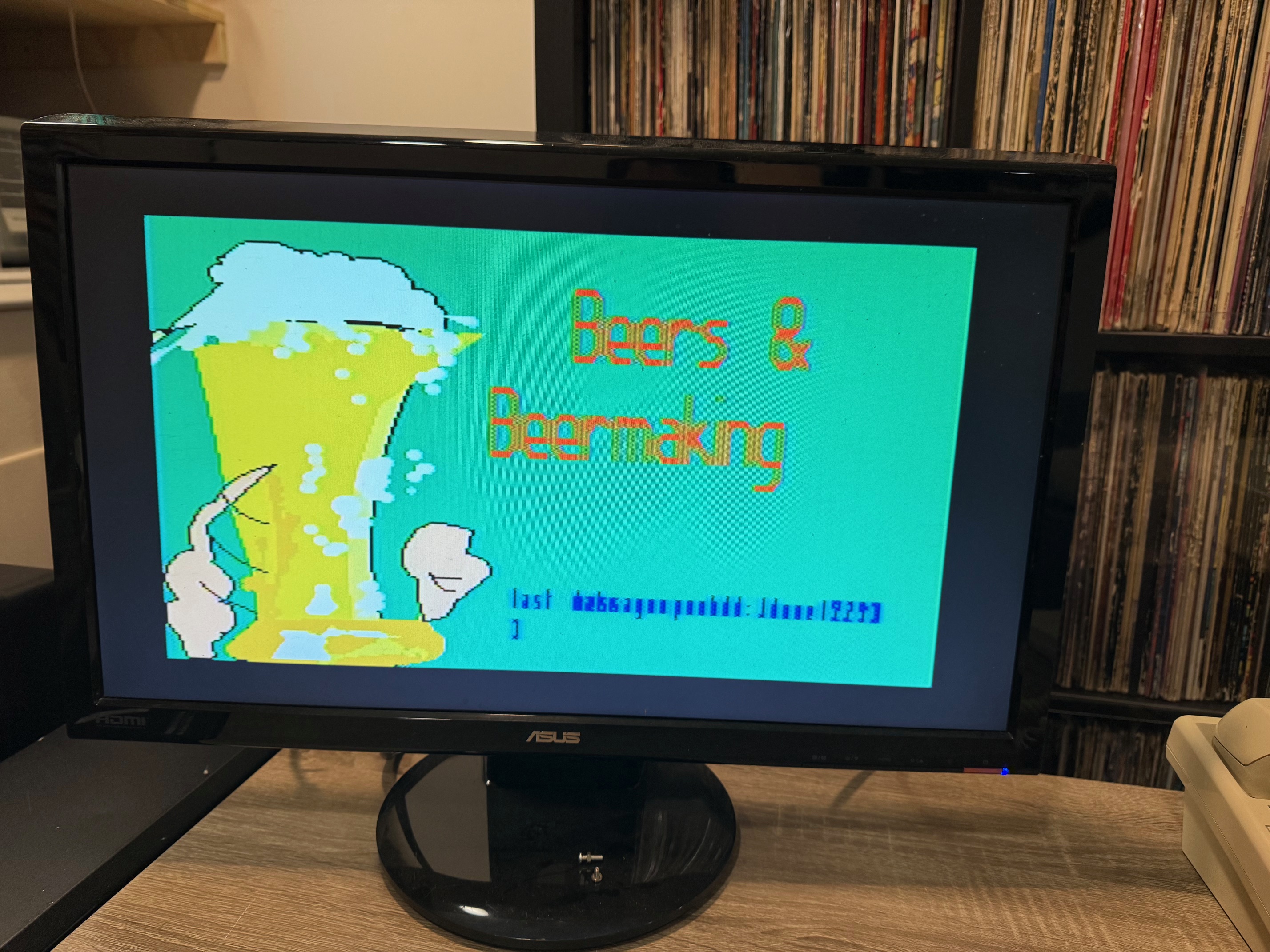
That’s all there is to it. Connecting to a server running this from the Sceptre will result in images being rendered in a loop indefinitely. There will still be an occasional hiccup resulting in the image not rendering properly but it seems fairly stable.
Demo Line & Exhibition
The next step was to allow others to connect to this service. I configured one of my PBXs to allow connection from a few different ways:
- PSTN (US/Canada only) - 267-921-1337
- PhreakNet - 263-0502
- Direct SIP
- Server: sip.dialup.world
- Port: 16556
- User: naplps
- Password: naplps
- Codecs: G.711/ulaw ONLY
- Number: any
One of the benefits of NAPLPS being a standard is that this should work for other terminals aside from just the Sceptre. I haven’t had anyone confirm, but I would love to see if Telidon, Keyfax, or Alextel terminals can make a connection.
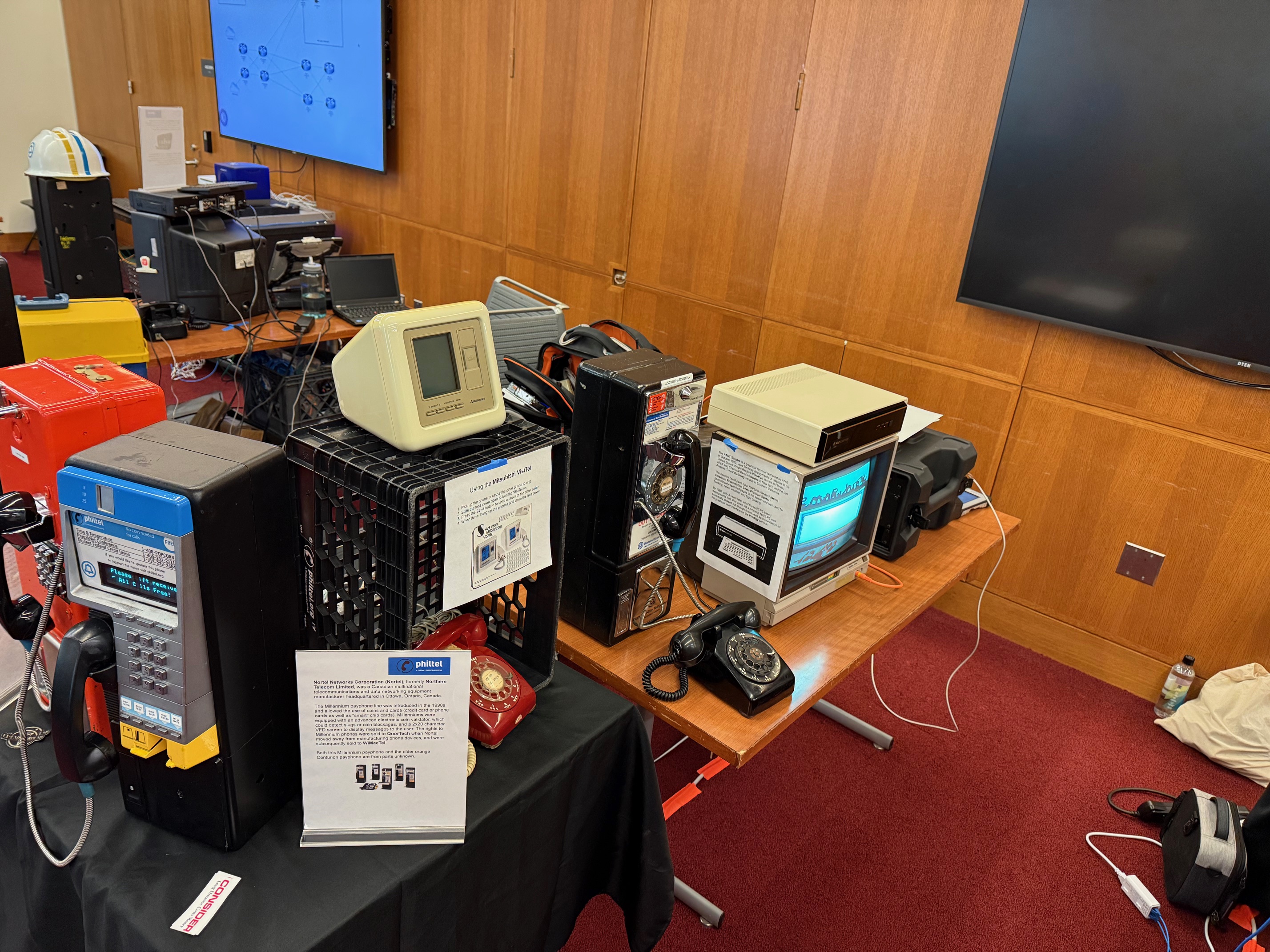
In October of 2025 the setup was taken to JawnCon and put on display at the PhilTel booth. For two days it was running for about eight hours a day, happily displaying graphics.
I ultimately made a video about the Sceptre and server software I wrote which went up on my YouTube channel in late December 2025.
Next Steps
There are a few more things I could see myself doing with the Sceptre and the NAPLPS server software in the future.
I would like to dump the ROM to share online. The 2364 mask ROM is not the most straight-forward when it comes to dumping, but it looks like there are several solutions available. The chip being socketed makes it even easier to remove from the board for dumping.
The Sceptre will occasionally have an error when interpreting data and display a parity error on the screen. Implementing parity should be easy as the Sceptre supports it in connection settings and it would be trivial to implement in the server software. I don’t know exactly how the routine would work but I imagine the Sceptre would transmit some sort of message back to the server on parity error at which point the same byte could be resent.
As previously mentioned, implementing some type of two-way communication would be really interesting.
I’ve been told that as part of the Prodigy Reloaded project, a NAPLPS editor that works on modern computers is being built. When that becomes available it would be great to leverage that for menuing or just to have people create and submit art to be included.
As previously mentioned, the Sceptre should support ASCII connections as well, meaning I would likely be able to connect to a traditional BBS or remotely log in to one of my servers.
That RS-232 port on the back seems like a lot of fun, even if it could only be leveraged for printing.
Sources
- https://en.wikipedia.org/wiki/Telidon
- https://en.wikipedia.org/wiki/Videotex
- https://en.wikipedia.org/wiki/NAPLPS
- https://en.wikipedia.org/wiki/Viewtron
- https://en.wikipedia.org/wiki/AT%26T_Sceptre
- https://en.wikipedia.org/wiki/Chemical_Bank
- https://en.wikipedia.org/wiki/Prodigy_(online_service)
- https://en.wikipedia.org/wiki/NABTS
- https://en.wikipedia.org/wiki/Alex_(videotex_service)
- https://scruss.com/blog/2023/09/18/the-glorious-futility-of-generating-naplps-in-2023/
- https://www.youtube.com/watch?v=0BKRfM5HHSM
- https://www.remembertomorrow.ca/en-ca